


At lufthansa.com, you can easily book and securely pay for your flight. In the sections below you will find information about all the available methods of payment and much more.
Available anytime and anywhere. Pay for your online booking on lufthansa.com conveniently and securely with your debit card.
What is a debit card?
Debit cards are linked to an account and are usually only available in conjunction with an existing current account with a bank. The debit card number consists of 13 to 19 digits and is printed on the front of the card along with the expiry date. The three-digit security number of the debit card is usually found on the back of the card in or close to the signature box.
Note: Bank or EC cards with a V-Pay or Maestro logo are often also described as debit cards. You can use these cards at cash machines worldwide to withdraw cash and make cashless payments in store by entering your PIN or signature. But not all these cards can be used for online payments. The bank that issued your card can give you more information about this.
Unlike with a credit card, using a debit card to make a cashless payment means that the equivalent amount will be debited to the current account linked to the card within just a few days. Payments are therefore only possible if you have sufficient funds in your account. With a credit card, by contrast, payments are debited only at certain intervals, usually once a month.
You can pay with the following debit cards on lufthansa.com:
Corporate debit cards:
- MasterCard Debit
- Visa Debit
- Visa Electron
How do I pay with a debit card on lufthansa.com?
You can complete the "Debit/Credit cards" field if you would like to pay using an international debit card: Visa Debit/Visa Electron or Mastercard Debit. You will be asked to fill in your card number, expiry date and the security code. The booking will then proceed.
To pay using a Degussa Corporate Debit Card or AirPlus Corporate Debit Account, please use the "Corporate Debit Cards" field provided. Please note that payments using corporate debit cards are only available in certain countries.
* Degussa Corporate Cards beginning 528159 are accepted.
** AirPlus Corporate Cards beginning 122088 or 192088 are accepted.
Paying for your online booking is especially easy when you use your credit card.
Which credit cards can I use when booking online?
You can pay using the following credit cards:
- VISA Card
- Mastercard
- American Express
- Diners Club/Discover
- JCB Card
- AirPlus Company Account/UATP
How do I pay with a credit card on lufthansa.com?
Simply store your credit card once in your user profile. If you haven’t set up a profile yet, you can enter this information when you book.
Please note that you may incur an additional charge with certain methods of payment.
What is 3D Secure and how do I use it for my card?
3D Secure is the technical name for a security standard applied to online purchases made using credit or debit cards. For Mastercard it is called "Mastercard Identity Check", for Visa "Visa Secure", for American Express "Safekey", "J/Secure" for JCB, and "ProtectBuy" for Diners and Discover.
Lufthansa adheres to the new legal regulations and applies Strong Customer Authentication to all its own payment processes. Strong Customer Authentication (SCA) is a requirement of the Second EU Payment Services Directive (PSDII) for payment service providers in the European Economic Area (EEA) and/or credit and debit cards issued in the EEA. Online payments must be confirmed by at least two of the following three elements:
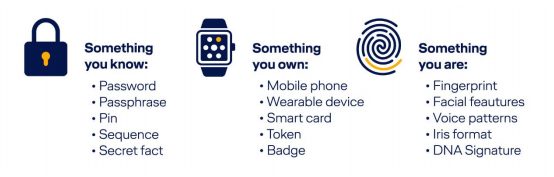
The requirements of the Payment Services Directive increase the security of electronic payments.
Your transactions are protected, e.g. by a personal password or a transaction number (mTAN) sent to your mobile phone via text message (identification procedures may vary depending on the bank). This allows you to make online purchases with confidence. You may also be asked to answer a security question. The security question and your answer are set up when your card is registered with your bank. The security question often appears in a separate pop-up window. Please ensure that your browser’s pop-up blocker has been deactivated.
How does 3D Secure work?
If 3D Secure authentication is required for your online transaction, an input window will open after you enter your card details. You will then be asked for your password or mTAN and/or you will be asked the security question linked to the card. If all the details are correct, the bank will confirm that you are the authorized card holder and the payment process can continue.
The first time you make a payment using the 3D Secure system, you will be prompted to register for 3D Secure after entering your credit card or debit card details. A dialogue box from the bank that issued the card will open and you can complete your registration.
You can find further information about 3D Secure on the homepage of your bank.
You can make online payments with a UnionPay card securely and conveniently from China, Germany, Portugal, Italy, Great Britain, Hong Kong and Switzerland.
What is UnionPay?
UnionPay (also known as China UnionPay, CUP, or UPI) is one of the world’s biggest card networks with over 7 billion cards in circulation. The UnionPay Online Payment (UPOP) programme is UnionPay’s global payment programme for e-commerce transactions.
You can pay with the following UnionPay cards on lufthansa.com:
UnionPay cards (card numbers beginning with 62)
Other credit cards with the UnionPay logo
Debit cards with the UnionPay logo, including payroll cards, financial management cards and savings cards
How do I pay using UnionPay cards on lufthansa.com?
If you select the payment method "UnionPay card" on lufthansa.com, you will be transferred directly to the UnionPay homepage. In order to ensure that your ticket is issued immediately, please wait until the payment has completed successfully and you will be redirected to the Lufthansa confirmation page. Please do not close your browser, refresh the page or click the "Back" button on your browser.
Please note that payment by UnionPay card is only available for residents of China, Germany, Portugal, Italy, Great Britain or Hong Kong, and for fares quoted in CNY, EUR, GBP, HKD, USD and CHF.
Make easy and secure payments with one of China’s most popular digital payment methods.
How do I pay using Alipay on lufthansa.com?
Before you pay using Alipay for the first time, you must open an Alipay account and store a source of payment in your profile.
If you are paying for a ticket on lufthansa.com using Alipay, you will be redirected to an external Alipay page. There are two options for completing a payment:
You can use the Alipay app on your mobile device to scan the relevant QR code or use Alipay’s web checkout option and sign in to your Alipay account with your login information. You only need to choose a bank account and complete the transaction by entering your password.
In order to ensure that your ticket is issued immediately, please wait until the payment has completed successfully and you will be redirected to the Lufthansa confirmation page. Do not close or refresh your browser or click the "Back" button while waiting for payment to complete.
Payment with Alipay on lufthansa.com is only available to residents of China who have a confirmed proof of identity and for fares quoted in CNY, EUR, GBP, HKD or USD.
PayPal is a global provider of online payment services that enables customers to pay online, including on lufthansa.com.
What is PayPal?
PayPal is a free online payment service that allows you to make secure and convenient online transactions.
How do I pay using PayPal on lufthansa.com?
You must register with your personal information and account details to use PayPal. Registration is free of charge. If you select PayPal as your payment method on lufthansa.com, you will be transferred directly to the PayPal website. Once the payment has been made successfully, you will be redirected to the Lufthansa payment confirmation page.
Paying with WeChat Pay is as simple as chatting with friends.
What is WeChat Pay?
WeChat is a versatile Chinese messaging, social media and mobile payment app. WeChat Pay is a cyberwallet service integrated into WeChat that allows users to make mobile payments and transfer money to contacts.
How do I pay using WeChat Pay on lufthansa.com?
You must open a WeChat account before paying using WeChat Pay for the first time and store a source of payment in your profile. If you select WeChat Pay as your payment method on lufthansa.com, you will be redirected to an external page displaying a QR code. You just need to scan the QR code using your WeChat app and wait to be redirected to the Lufthansa confirmation page once payment is completed.
Payment with WeChat Pay on lufthansa.com is only available to residents of China and for fares quoted in CNY, EUR, GBP, HKD or USD.
With the online bank transfer iDEAL, you can make online payments securely, reliably and easily.
What is iDEAL?
iDEAL is a direct transfer process that allows you to make transfers in real time. Payments are made via the mobile banking app or in the online banking environment of your bank.
How do I pay using iDEAL on lufthansa.com?
If you select iDEAL as your payment method on lufthansa.com, you will be redirected to the homepage of your bank. You just need to log in using your bank details and confirm the process with a TAN. Once the payment has been made successfully, you will be redirected to the Lufthansa payment confirmation page.
To use iDEAL, you must have online banking with one of the following banks: ABN AMRO, ASN Bank, bunq, Friesland Bank, ING, Knab, Rabobank, RegioBank, SNS Bank, Triodos Bank, or Van Lanschot Bankiers.
Please note that payment with iDEAL is only available to residents of the Netherlands and for fares quoted in EUR.
What is Instant Bank Transfer?
Instant Bank Transfer is a real-time payment method that allows you to securely pay directly from your online bank account during the booking process, ensuring immediate confirmation of your travel plans
How to pay with Instant Bank Transfer
If you decide to use Instant Bank Transfer as a payment method on the payment page, you will be redirected straight to the secure website, where you can select your bank and enter your online banking details. The payment must be confirmed with a Transaction Authentication Number (TAN). After payment, you will be forwarded to the Lufthansa booking confirmation page.
Important Information
Please note that payment with Instant Bank Transfer is only available for customers having a telephone number and online banking in any of the following countries: Austria, Belgium, Germany, Estonia, Finland, France, Ireland, Italy, Latvia, Portugal and United Kingdom. This payment method is applicable for flights priced in EUR and GBP.
Klarna is a global provider of online payment services that enables customers to pay online via online bank transfer immediately (“Pay in full today”), via invoice in 30 days (“Pay in 30 days”) or in installments (“Pay over time”) depending on the respective travel.
Pay in full today
What is Pay in full today (former “Sofort”)
Klarna’s “Pay in full today” option allows you to make an online bank transfer for the full amount from your bank account. As the transaction confirmation takes place in real time, Lufthansa can issue your ticket immediately.
How do I pay using Pay in full today on lufthansa.com?
If you select Pay in full today as your payment method on lufthansa.com, you will be redirected to Klarna where you can select your bank and enter your online banking details. Once the payment has been made successfully, you will be redirected to the Lufthansa payment confirmation page. Please note that Pay in full today is only available in certain countries and only for transactions in EUR.
Pay in 30 days
What is Pay in 30 days (invoice)
Klarna’s “Pay in 30 days” option allows you to buy your ticket now and pay later, with up to 30 days to settle your purchase without interest or fees. As the transaction confirmation takes place in real time, Lufthansa can issue your ticket immediately.
How do I pay using Pay in 30 days on lufthansa.com?
If you select “Pay in 30 days” as your payment method on lufthansa.com, you will be redirected to Klarna where you have to register yourself. Once Klarna has authorized the payment, you will be redirected to the Lufthansa payment confirmation page. Please note that Pay in 30 days is only available in certain countries and only for transactions in EUR, CHF, NOK, SEK or DKK.
Pay over time
What is Pay over time (instalments)
Klarna’s “Pay over time” option allows you buy your ticket now and break down your purchase into smaller, manageable installments instead of paying the full amount upfront. Please note, that interests may apply by Klarna. As the transaction confirmation takes place in real time, Lufthansa can issue your ticket immediately.
How do I pay using Pay over time on lufthansa.com?
If you select "Pay over time" as your payment method on lufthansa.com, you will be redirected to Klarna where you have to register yourself and choose the number of installments. Once Klarna has authorized the payment, you will be redirected to the Lufthansa payment confirmation page. Please note that Pay over time is only available in certain countries and only for transactions in EUR, NOK, SEK or USD.
What is Cash & Miles?
Cash & Miles enables Miles & More members to redeem their miles in part or in full for flights on lufthansa.com. This is possible from just 3,000 miles and for all travel classes. The fare is calculated based on the total ticket price, including taxes, fees and surcharges.
How does Cash & Miles work?
- Enter your Miles & More login details
- Choose the flight you wish in the booking window
- Select how many miles you would like to redeem
- Complete your booking securely
Pay simply and securely with Apple Pay.
What is Apple Pay?
Apple Pay is a payment service from Apple. It allows users to make payments via their Apple devices such as an iPhone, Apple Watch, iPad or Mac. Apple Pay enables users to make secure and contactless payments in shops, apps and on websites by using the credit or debit cards they have stored.
How do I pay using Apple Pay on lufthansa.com?
Lufthansa offers Apple Pay for many currencies on your iPhone, iPad or Mac. To use Apple Pay, add your credit or debit card to the Wallet app on your Apple device. Authentication is completed via Touch ID, Face ID or your password. You can use the relevant card for payments without needing to have the physical card to hand.
The following cards from the Apple Wallet are accepted:
- Visa
- Mastercard
- American Express
Convenient online payment without having to re-enter your card details
With Click to Pay, you can use your credit or debit card without having to re-enter your card details for every transaction. When you pay, you are identified via your email address, and the payment is processed quickly.
Your card information is protected throughout the process. If necessary, the payment is securely confirmed by your bank.
Benefits of Click to Pay
- Faster and easier payment process
- No need to re-enter card information
- High security standards
- Can be used even without a customer account
- Payment by instalments
Residents of Brazil and Colombia have the option of paying by instalments if their trip begins in their country of residence and the credit card used for payment was issued in the same country.
If your route entitles you to pay in instalments, you can select this option directly on the payment page. Once your reservation has been entered in the system, you will be sent a booking code and all you have to do is contact our customer service regarding the payment plan.
- In-agency payment
Residents of the countries listed below have the option of booking online and paying at a specific agency within a set time limit. Please note that this option is not available for last-minute departures and the journey must start in your country of residence.
Online reservation with cash payment is available in the following countries: Algeria, Equatorial Guinea, Kenya, Morocco, Nigeria and Tunisia.
- Other local payment options
Residents of selected countries can use the payment methods listed below if their country of departure is the same as their country of residence. You can choose the local payment method on the payment page to use these services. Once your reservation has been entered in the system, you will receive an email confirmation with detailed payment information. Please note that this option is not available for last-minute departures.
Nigeria: bank transfer or local debit cards
Spain: Bizum
What is Bizum?
Bizum is an easy and secure real-time bank transfer payment method available exclusively to customers of Spanish banks, using the Bizum scheme in Spain for instant online payments. Please note that payment via Bizum is only available to customers with a Spanish phone number.
India: UPI
What is UPI?
UPI (Unified Payments Interface) is a real-time bank transfer payment method based on the UPI scheme in India. It provides a fast, easy, and secure instant bank transfer service between bank accounts using a mobile device available exclusively to customers of Indian banks. Please note that UPI payments are only available to customers with an Indian phone number and for flights priced in INR.
Brazil: PiX
What is PiX?
PiX is a real-time bank transfer payment method based on the PiX scheme in Brazil. It offers a fast, easy, and secure instant bank transfer service, available exclusively to customers of Brazilian banks. Please note that PiX payments are only available to customers with a Brazilian phone number and for flights priced in BRL.
Thailand: PromptPay
What is PromptPay?
PromptPay is a real-time bank transfer payment method that uses the PromptPay scheme in Thailand. It offers a fast, easy, and secure instant bank transfer service, exclusively available to customers of Thai banks. Please note that PromptPay payments are only available to customers with a Thai phone number and for flights priced in THB.
Hong Kong: FPS
What is FPS?
FPS (Faster Payment System) is a real-time bank transfer payment method based on the FPS scheme in Hong Kong. It provides a fast, easy, and secure instant bank transfer service, available exclusively to customers of Hong Kong banks. Please note that FPS payments are only available to customers with a Hong Kong phone number and for flights priced in HKD. Before proceeding, check your FPS transfer limit with your bank to ensure it is sufficient to complete your payment.
Kenya: bank transfer or mPESA
What is MPESA?
MPESA is a mobile phone-based money transfer service, allowing users to send, receive, and store money using their mobile phones. Please note that MPESA payments are only available to customers with a Kenyan phone number and for flights originating in Kenya. Once the booking is completed, the payment details will be sent via email in order to complete payment with MPESA. In case Lufthansa does not receive the payment within 72 hours after booking, the reservation will be automatically cancelled
Please note that prices may vary depending on which payment method is used.
The availability of specific payment methods may vary depending on your country of residence, currency of the travel route and the time to departure, or depending on third-party products in the shopping cart.